AI studio for vocal and guitar cover practice

Try the public demo before you sign in

Turn one song into a vocal or guitar practice session

Open the public demo first to explore stem mixing, loop playback, lyrics, and score flow. If it clicks, continue with your own song.

See features first
  • For vocal and guitar covers
  • No sign-in required
  • Read-only public studio
  • Lyrics and score included
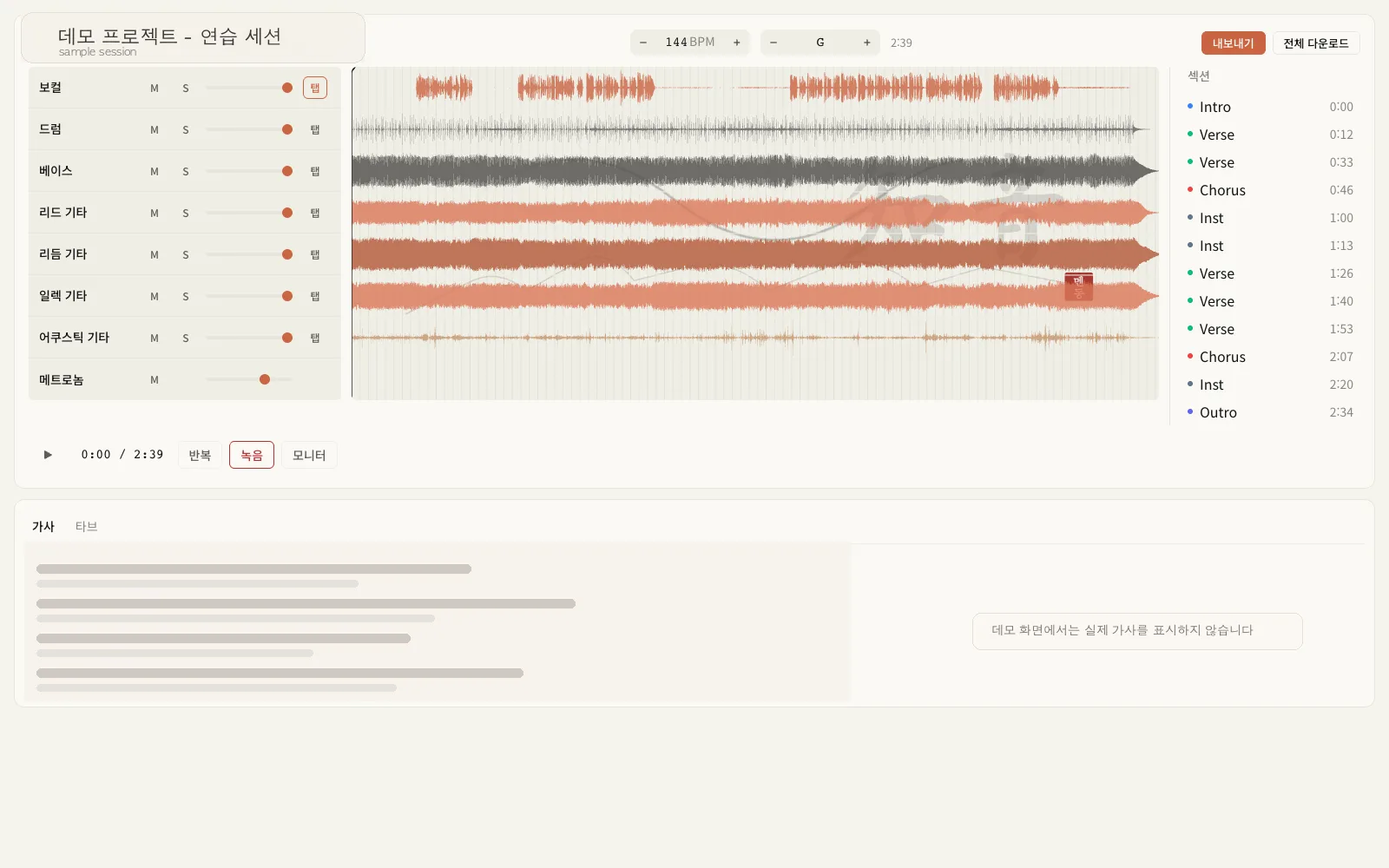
Jium studio screen showing track mixer, waveform, sections, and lyrics together
Move through the track mixer, waveform, sections, and lyric panel within one song.

Practice flow

Three steps from opening a song to starting practice

Parts first

The song is organized into parts right away

After the original is separated, you can keep only your instrument or mute it and practice as if you were playing with the band.

Loop sections

Repeat only the hard part in short loops

Once the structure is split, jump straight to a verse or chorus and repeat only the section you need.

Check takes

Review your own performance and vocals

Record over an instrumental backing, then listen back while checking tone and timing with the lyrics.

Best for

From vocal MR practice to guitar cover drills, it stays in one screen

We combined the flow you actually look for in vocal and guitar cover practice: track separation, section looping, lyrics or score, and recording review.

Start vocal backing-track practice quickly

Create a backing track with vocals lowered or removed, then keep loops and lyric scrolling on one screen to speed up cover practice.

Open a full guitar cover workflow at once

Repeat riffs, clean up the mix so the guitar stands out, and jump into the score when needed to cut setup time.

Keep only the practice views you need after separation

Once track separation is done, move straight into section loops, lyrics or score, and take comparison without breaking the flow.

Core features

Only the features that matter during practice

The screen focuses on the actions musicians actually reach for, like track cleanup, loop playback, and recording comparison.

01

Trim the mix down to only what you need to hear

Separate vocals, drums, bass, and guitar, then mute or rebalance each part to build a practice mix right away.

02

Split the song into sections and loop only what you need

Mark verses and choruses first, then repeat the exact section that needs more work.

03

Record over an instrumental backing and compare again

Record immediately over the vocal-off backing and compare your take with the original on the same timeline.

04

Follow the lyrics in time with the song

Scroll extracted lyrics with timing so you can sing along and replay the parts that feel off.

FAQ

Questions people often check before signing in

We summarized what you can explore in the public demo first and how the flow continues with your own songs afterward.

How far can I explore without signing in?
In the public demo you can preview playback, stem mixing, section loops, lyrics, and score in a read-only studio.
What makes vocal practice faster here?
You can build a backing-track balance immediately and loop only the passages you need while checking lyrics at the same time.
What can I inspect right away for guitar practice?
After bringing the guitar forward in the mix, you can review the waveform, sections, lyrics, and score in one continuous flow.
How do I continue with my own song after the demo?
Once you like the flow, sign in, upload your song, and continue with separation, loops, and take comparison in the same studio.

Continue with my own song

Preview the full song-to-practice-session flow in the demo first

The public demo leaves playback, stem mixing, section loops, lyrics, and score open so upload and recording can follow right after sign-in.